
Find the money your vendor isn’t entitled to charge you.
Contract renewal intelligence for teams without a procurement department. Upload your contract and your vendor’s renewal quote. Renewly checks the increase against the price cap your contract actually allows, then shows you the overcharge and the date you have to cancel by.
Free · No signup required
Contract-aware
Reads the cap your contract actually sets
Quote-aware
Checks the renewal against that cap
Deadline-aware
Tracks the date you must cancel by
Negotiation-ready
Turns the finding into a counter-offer
Most renewals get accepted, not checked.
Your vendor wants more money. Whether they're allowed to ask for it usually isn't checked — because the contract that would answer that question isn't sitting next to the quote.
Your vendor sends a renewal quote
It lands as an email, a PDF, or a line in a spreadsheet.
The price is higher than last year
$50,000 becomes $58,000. No explanation of what the increase is based on.
The original contract is buried
In a folder, an inbox, or a shared drive — not next to the quote.
Nobody checks, so it gets accepted
Renewing feels easier than digging up a document from 2023.
The company overpays
Quietly, once a year, across every vendor this happens with.
That’s what Renewly checks
Put the contract and the quote next to each other, automatically.
Put the quote next to the contract. See the gap.
Upload both documents. Renewly reads them the way a careful procurement lead would, then shows exactly where the renewal goes beyond what you agreed to.
Overcharge found
$6,500
above what your contract allows
Cancel by March 14
21 days left
Section 6.2, page 4
The clause behind the number
Next: ask the vendor to bring the renewal down to $51,500
The figures in this demo are an example, not a customer result. Your analysis uses your own contract and quote. See the renewal quote comparison walkthrough for the checks behind the calculation.
Analyze my renewal quoteRenewly found the problem. Now it helps you push back.
Turn the finding into a counter-offer email. Tell Renewly your position, whether you're ready to walk or just testing the number, and pick a tone. Try it below.
Where do you stand?
Tone
The draft is built from the finding
- Vendor quote
- $58,000
- Contract allows (3%, §6.2)
- $51,500
- Over the cap
- $6,500
Hi team,
Thanks for sending over the renewal. Section 6.2 of our agreement caps annual price increases at 3%, which puts the maximum allowable renewal at $51,500. The quote we received was $58,000.
We’d like to renew at the contracted rate. Happy to get on a call this week if useful.
Best,
Your first counter-offer on each contract is free.
The negotiation is finished. What did you actually keep?
Record how it ended and Renewly works out what you kept against the original quote, then adds it to a running total across every vendor.
This negotiation: cloud hosting
Savings realised
$6,000
10.3% below the original quote
Cloud hosting provider
+$6,000
$58,000 → $52,000 · 10.3% saved
Insurance broker
+$3,050
$34,800 → $31,750 · 8.8% saved
Payroll platform
+$1,500
$21,400 → $19,900 · 7.0% saved
Savings Realised
9.2% below $114,200 in original quotes
$10,550
Quote Analyzer is the entry point. What’s underneath is a full renewal system.
Contract intelligence, renewal alerts, auto-renewal protection, spend visibility, and a team that isn’t relying on one inbox to catch everything.
Explore the contract renewal features or follow how a renewal decision moves through Renewly.
Never miss a renewal.
Renewly sends alerts at 90, 30, and 7 days before an important renewal or notice deadline — so a decision gets made instead of a default.
90 days
First alert — plenty of runway to check the contract
30 days
Second alert — time to start a negotiation if needed
7 days
Final alert — the cancellation window is closing
Cancellation-deadline trackingRenewly works out the last day you can cancel each contract, and counts down to it — even when the contract auto-renews.
Renewly doesn't just tell you when something renews. It tells you when you must act.
Upload a contract. Renewly reads it like a document, not a blob of text.
Every term that affects a renewal is pulled out, flagged by how much it matters, and linked back to the exact clause. Click any term to see where it came from.
Master Services Agreement
What Renewly found
Priority: High8 terms found · 1 risky clause · 1 deadline
Quote Analyzer
Checks the next quote against the 3% cap.
Renewal alerts
Reminds you before the March 15 notice date.
Command Center
Ranks this contract High, so it surfaces first.
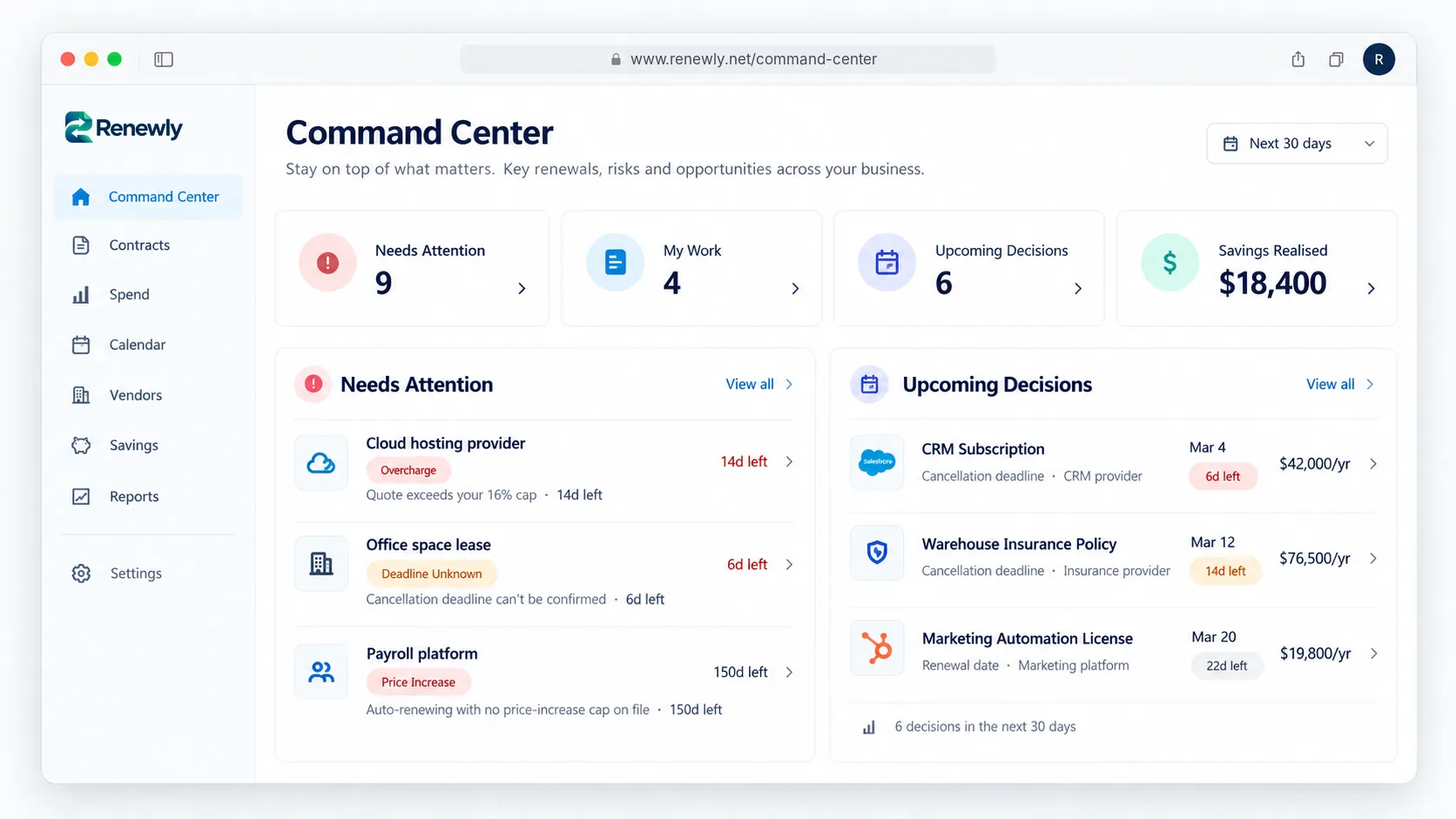
Know what needs your attention. Take action before renewals cost you.
Every contract, ranked by the Renewal Opportunity Score — our tier for what actually needs a decision: a confirmed overcharge, an approaching deadline you can't confirm, or a cap that was never put on file.
Your contracts become queryable business knowledge.
Sarah is an assistant that answers questions about your contracts, spending, and deadlines in plain language, with no filtering through folders to find the answer. Try one of the questions.
8 contracts renew within 60 days. 3 have notice deadlines in the next 30 days, including the cloud hosting renewal flagged over its price cap.
- CRM subscription: cancel by Mar 4$42,000/yr
- Cloud hosting: cancel by Mar 15$58,000/yr
- Marketing automation: renews Mar 20$19,800/yr
See what every vendor is actually costing you.
Contracts grouped by vendor, with spend, renewal date and status in one view, instead of scattered across inboxes. Sort a column or filter by status to try it.
Annual vendor spend
$272,000
Vendors tracked
6
Needs a decision
3 of 6
Savings realised
$10,550
| Share of spend | Status | ||||
|---|---|---|---|---|---|
| CRM subscription | $42,000 | 15% | Mar 4 | Review | — |
| Marketing automation license | $19,800 | 7% | Mar 20 | On track | — |
| Cloud hosting provider | $58,000 | 21% | Apr 14 | Over cap | +$6,000 |
| Payroll platform | $21,400 | 8% | Jun 2 | On track | +$1,500 |
| Insurance broker | $34,800 | 13% | Jul 19 | On track | +$3,050 |
| Office space lease | $96,000 | 35% | Sep 30 | Review | — |
| Total | $272,000 | $10,550 | |||
Renewals stop living in one person's inbox.
Give people the right level of access, so the right person owns each renewal decision.
Owner
Full control — billing, team, and every contract
Admin
Manage contracts, negotiations, and vendors
Member
View-only access to contracts and vendors, without edit access
Trustworthy by default, not by marketing claim.
Encryption in transit and at rest
Your documents and data are encrypted in transit and at rest.
Account data separation
Each account’s contracts and data are kept apart from every other.
Role-based access
Owner, admin, and member roles control who can act.
Frequently asked questions
Is the Quote Analyzer really free?
Yes. You can run it without an account and without paying — upload a contract and a quote and get the result.
What does it actually check?
One thing, well: whether the renewal's price increase breaks the cap your contract sets, and the date you'd need to cancel by. It isn't a general legal review.
What is the Command Center?
Your single place to see what needs attention, what decisions are coming up, and what actions to take across every vendor renewal. It ranks your contracts by what actually needs a decision — a confirmed overcharge or an unconfirmed cancellation deadline first, a missing price cap next — instead of showing every contract as equally urgent.
What happens to my analysis if I sign up?
It becomes your first tracked contract automatically — you don't re-upload anything.
How many counter-offer drafts do I get?
Your first on each contract is always free. After that: 3 on Free, 20 a month on Starter, unlimited on Growth.
Is my data secure?
Your files are encrypted in transit and at rest, and each account’s data is kept separate from every other. See our Trust page for the full breakdown.
Plan your next renewal with better evidence
Follow an agreement from upload and review to a renewal decision.
Explore renewal management for finance, operations, and founders.
Start with verified dates, clear ownership, and an actionable register.
Before you accept the next renewal quote, check what your contract actually allows.
Run one quote through it. It’s free, and it takes about a minute.
Free · No credit card required
Want to compare plans? See plans and pricing